
Virtual fitting rooms are digital systems that allow online shoppers to preview how garments, eyewear, accessories, or cosmetics might look on them before completing a purchase. These systems typically combine live or uploaded images with computer graphics and computer vision to place virtual products over a person’s photo or video. Relevant technologies include augmented reality (AR) that overlays content in real time, machine learning models that interpret body shape and pose, and 3D visualization engines that render garments or objects with shading and perspective matched to the user’s image.
Implementation may involve several coordinated steps: acquiring an image or video input, detecting relevant landmarks (for example facial features or shoulder points), mapping a virtual asset to those landmarks, and adjusting appearance based on lighting, scale, and texture. Systems often include size-estimation components that infer measurements from images or ask users for input. Device capabilities, browser support, network speed, and privacy practices typically shape how accurate and responsive a virtual fitting room feels to the user.
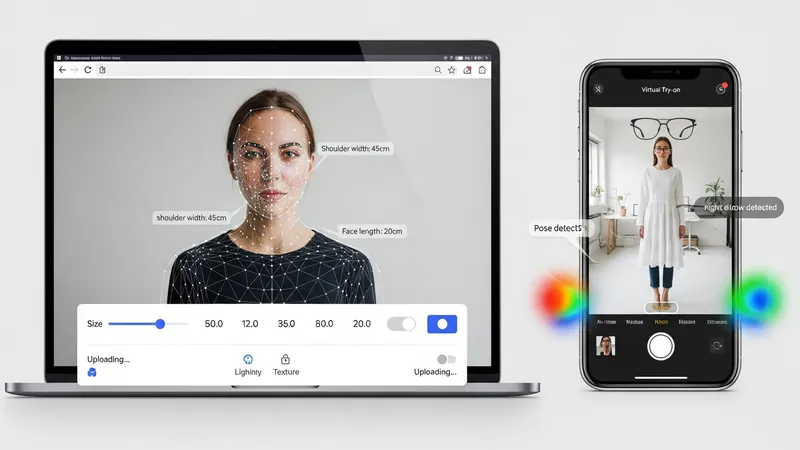
Augmented reality overlays and 3D rendering serve different trade-offs. AR overlays may be faster to run on mobile devices and work well for simple try-ons such as glasses or hats. 3D rendering can present more realistic drape and material detail for clothing but may require higher compute resources or pre-scanned models. Developers and merchandisers often balance realism, latency, and device reach: some approaches prioritize wide accessibility on smartphones, while others aim for higher visual fidelity on modern devices with greater processing capability.
Body measurement and sizing components typically rely on statistical models and image-processing heuristics that can reduce, but not eliminate, uncertainty. Accuracy can vary with pose, clothing worn during measurement, camera angle, and image resolution. Privacy and data handling are important considerations: measurement images and derived metrics may be treated as personal data in some jurisdictions, so systems often provide options to perform processing on-device or to store only derived, non-identifying metrics.
Device and environment factors influence perceived accuracy. Ambient lighting, camera quality, and background clutter can affect landmark detection and texture mapping. Some virtual try-on systems include guidance screens that suggest how to position the camera or choose lighting, while others adapt automatically through preprocessing steps. Browser-based implementations may prioritize compatibility and require fewer user permissions, whereas native apps can access additional sensors that may improve tracking and depth estimation.
Integration with online retail workflows typically involves linking product metadata (size charts, SKU images, material properties) with the try-on engine so that mapped items reflect actual inventory. Analytics from virtual try-on sessions may be used to monitor engagement patterns and common fit issues, often expressed as aggregated trends rather than individual diagnostics. Costs and technical effort vary with the level of fidelity and the number of SKUs; some organizations pilot try-on for a subset of product categories before wider rollout to manage complexity. The next sections examine practical components and considerations in more detail.
Augmented reality overlays place virtual items onto live camera input using tracking and segmentation. For eyewear, overlays often align frames to facial landmarks (eyes, nose bridge, temples) and follow head rotation. For clothing, overlays may use shoulder and torso landmarks to estimate position and scale. Overlay approaches can be pixel-based (2D image warping) or geometry-based (mapping a 3D asset to detected coordinates). Each approach may require trade-offs between visual realism and execution speed; slower, geometry-based methods can present more convincing perspective but may need more processing power.
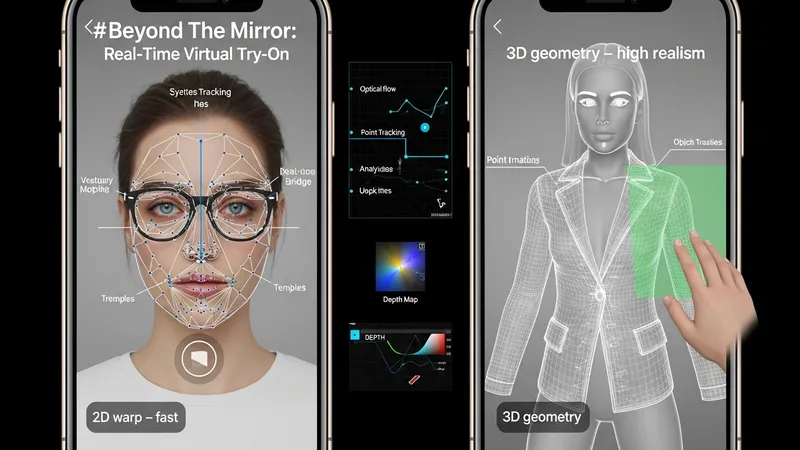
Tracking and occlusion handling are common technical challenges with AR overlays. Reliable tracking typically uses point detection, optical flow, or model-based pose estimation to follow movement between frames. Occlusion — for example when a hand passes in front of a garment — often requires depth cues or segmentation masks to render objects in front of or behind body parts plausibly. Some systems use simple heuristics for common scenarios, while others incorporate depth-sensing hardware or learned depth estimation to improve occlusion fidelity on compatible devices.
Environmental variability affects AR overlay performance. Lighting changes can alter perceived color and shading, so many systems include automatic white-balance adjustments or estimate scene illumination to shade virtual items more consistently. Background complexity and loose clothing on the user may interfere with landmark detection; guidance screens that suggest minimal clothing or a plain backdrop may improve initial capture. Designers often frame such guidance as optional suggestions that may improve results rather than strict requirements.
Operational considerations include asset preparation and camera permissions. Virtual assets need consistent origin points, scaling metadata, and simplified collision geometry when used in overlays. Developers may prepare multiple LODs (levels of detail) to accommodate a range of devices. Camera permission requests and clear explanations of how image data is handled are common practice: many implementations either process images on-device or transmit only non-identifying fit parameters to back-end systems to align with privacy expectations.
AI-driven measurement approaches typically fall into categories such as single-image estimation, multi-image reconstruction, or depth-assisted scanning. Single-image methods use statistical relationships learned from labeled datasets to infer body dimensions from a single front or side photo. Multi-image methods combine several views to triangulate measurements. Depth-assisted scanning uses additional sensor input when available to refine estimates. Each method may provide useful approximations for size selection but can vary in precision depending on input quality and model training data diversity.
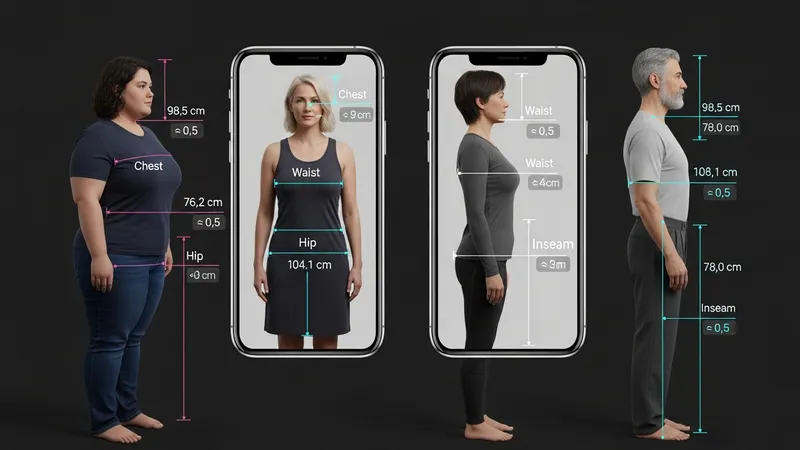
Model training and dataset composition influence estimation performance. Models trained on diverse body shapes, poses, clothing types, and skin tones may generalize more reliably across users, while limited datasets can introduce biases or systematic errors. That is why practitioners often validate models on separate datasets and report expected ranges of uncertainty rather than single-point measures. Communicating uncertainty to users — for instance by indicating a likely size range — can help set expectations and reduce overconfidence in automated estimates.
Privacy and consent are important when collecting measurement-related images. Some systems minimize retained data by performing measurement on-device and only transmitting derived metrics, or by anonymizing and aggregating data for analytics. Legal frameworks in different regions may classify biometric measurement information as sensitive, so design teams often treat measurement workflows conservatively: they implement minimal data retention, clear opt-in flows, and straightforward explanations of how results are used within the shopping process.
Practical considerations for deployment include calibration, user guidance, and integration with product sizing charts. Calibration steps may ask users to stand at a certain distance or to include a reference object, although developers increasingly prefer solutions that avoid additional props. Mapping measured dimensions to vendor size charts typically requires normalization and sometimes manual validation for particular brands or cuts. Teams often pilot size-mapping models on a subset of SKUs to refine mappings before wider application.
3D rendering for apparel and cosmetics uses geometric models and material definitions to simulate appearance on a user’s image. For clothing, mesh models and cloth-simulation shaders can represent drape and folds; for cosmetics, physically based rendering (PBR) and subsurface scattering techniques help depict how pigments interact with skin. Rendering pipelines often estimate scene illumination and camera parameters to blend virtual materials with the user’s photo. These steps can improve realism but typically increase compute needs compared with flat overlays.
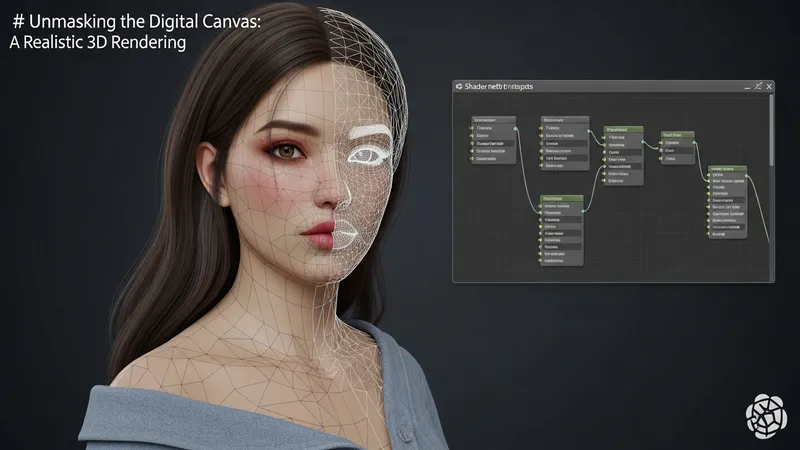
Color fidelity and cross-device consistency are notable challenges for cosmetic simulation. Screen calibration, device color gamut, and viewing conditions (brightness and ambient lighting) affect how colors appear to users. Some solutions implement color-management workflows that map virtual colors through standard color spaces and provide reference swatches for more consistent expectations. Even with such measures, perceived color can still vary by device, so many teams frame color simulations as indicative rather than exact matches.
Skin tone mapping and shade selection require careful handling to avoid bias and to present inclusive options. Accurate simulation often benefits from models that account for a range of undertones and reflectance properties. When systems provide recommended shades, they frequently present multiple nearby options and explain that shade appearance may vary with lighting and camera characteristics. Accessibility considerations also arise: textural and contrast choices in UI help users interpret simulations without relying solely on color perception.
Performance optimization and asset management are practical aspects of 3D rendering deployments. Developers commonly use simplified meshes, baked lighting, and compressed textures to reduce load times and runtime costs. Progressive enhancement strategies may present a simpler preview on lower-end devices while enabling richer rendering on capable hardware. From an operational perspective, maintaining a library of accurate product materials and synchronizing those with inventory metadata helps ensure that simulated items correspond closely to available SKUs.
Operational integration covers how virtual try-on connects with product catalogs, sizing metadata, and inventory systems. Accurate product descriptors (measurements, stretch factors, color identifiers) are necessary to align virtual assets with real items. Teams may implement processes to tag each SKU with standardized fit attributes so that the try-on engine can consistently render variations and map size recommendations. This metadata workflow often evolves iteratively as more products and user feedback are incorporated.
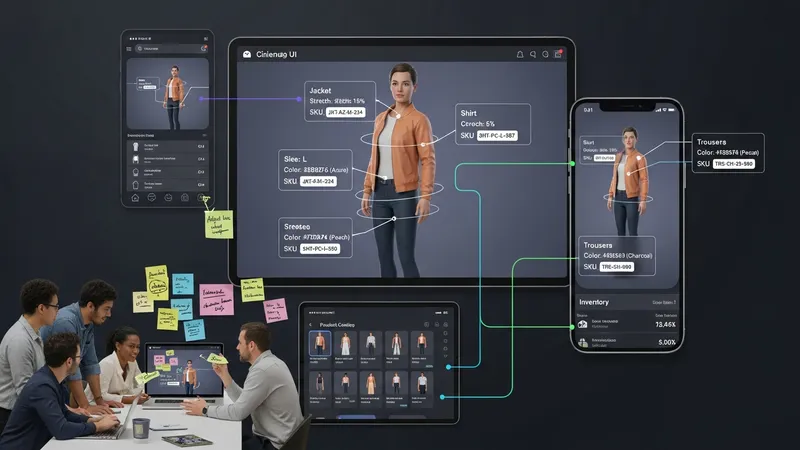
Performance, latency, and accessibility affect adoption and user satisfaction. Systems that require large downloads or long initialization times may see lower engagement on mobile networks. Progressive loading, lightweight previews, and fallback image-based try-ons are common strategies to expand compatibility. Accessibility features — such as alternative text descriptions, keyboard navigation, and clear contrast — help make virtual fitting rooms usable for people with different needs. Designers typically treat these as ongoing considerations rather than one-time additions.
Measuring outcomes usually relies on aggregated metrics such as session length, conversion rate relative to sessions without try-on, and return rates for items tried virtually versus not. Data interpretation requires care: correlations do not confirm causation, and external factors like promotions or seasonality can influence metrics. Many organizations use controlled pilots and A/B testing to better understand how try-on features may influence user behavior while avoiding overinterpretation of raw metric changes.
Privacy, compliance, and user trust are recurring considerations in operations. Clear disclosures about image capture, data retention, and the scope of automated sizing are central to transparent practice. Where applicable, local regulations may require specific consent flows or restrict biometric data handling; design teams often consult legal guidance to align practices with regional rules. Ongoing monitoring of accuracy, bias, and user feedback typically helps teams refine systems and communicate realistic expectations to shoppers.